Solana Framework-Kit - Developer's Guide to Getting Started
December 9, 2025If you're someone who's passionate about DX, you've probably came across the problems of fragmentation and complexity on DX tooling and libraries in solana. Framework-kit is exclusively built for that.
Coming from Ethereum and other ecosystem, I've been finding joy in learning rust, writing anchor programs while also exploring pinocchio but I was quite taken back with the frontend libraries and how they all worked together. It was quite manual and i felt indescribeable friction between toolings.
But framework-kit solves a lot of them. It already exceeded my expectation and I'm excited for it's continued growth with new features.
I decided to write this piece because, I've noticed how people are still quite confused what framework-kit does and why we even need that.
Let's dive into some of the fetaures and how you can get started.
Why Framework-Kit?
Before diving into the code, it's worth understanding and realizing the Solana JavaScript ecosystem's and why Framework-Kit represents something more exciting.
The Evolution of Solana JavaScript Libraries
| Era | Library | Key Features |
|---|---|---|
| 2020-2024: The Legacy Era | @solana/web3.js (v1.x) |
• Monolithic, class-based architecture • Everything bundled together (can't tree-shake) • ~311KB/226KB bundle impact even for simple apps • Connection class with dozens of methods you don't need • Still works, but archived/maintenance-only |
| 2024-2025: The Modern Foundation | @solana/kit (formerly web3.js v2) |
• Modular, function-based architecture • Fully tree-shakable (use only what you need) • Native BigInt, Ed25519, modern JS features • Type-safe RPC methods • Low-level primitives only (verbose boilerplate) |
| 2025: Data Fetching Hooks | Gill (core) / @gillsdk/react |
gill (core): • Built on @solana/kit• Higher-level abstractions • createTransaction helper• Scripts, backends, CLIs @gillsdk/react: • Data fetching hooks (TanStack Query) • useBalance, useAccount, etc.• ❌ No wallet orchestration • ❌ No real-time subscriptions • ❌ No staking, transaction pools |
| 2025+: The Complete dApp Framework ⭐ | Framework-Kit (Solana Foundation) | • Wallet orchestration (auto-discovery, persistence, reconnect) • Real-time subscriptions ( watchBalance, watchAccount)• Transaction pools (multi-instruction building) • Staking hooks ( useStake)• Numeric utilities ( lamportsMath, createTokenAmount)• Controllers (state machines for complex flows) • Centralized Zustand state (wallet + accounts + txs) |
How Framework-Kit Fits in the Ecosystem
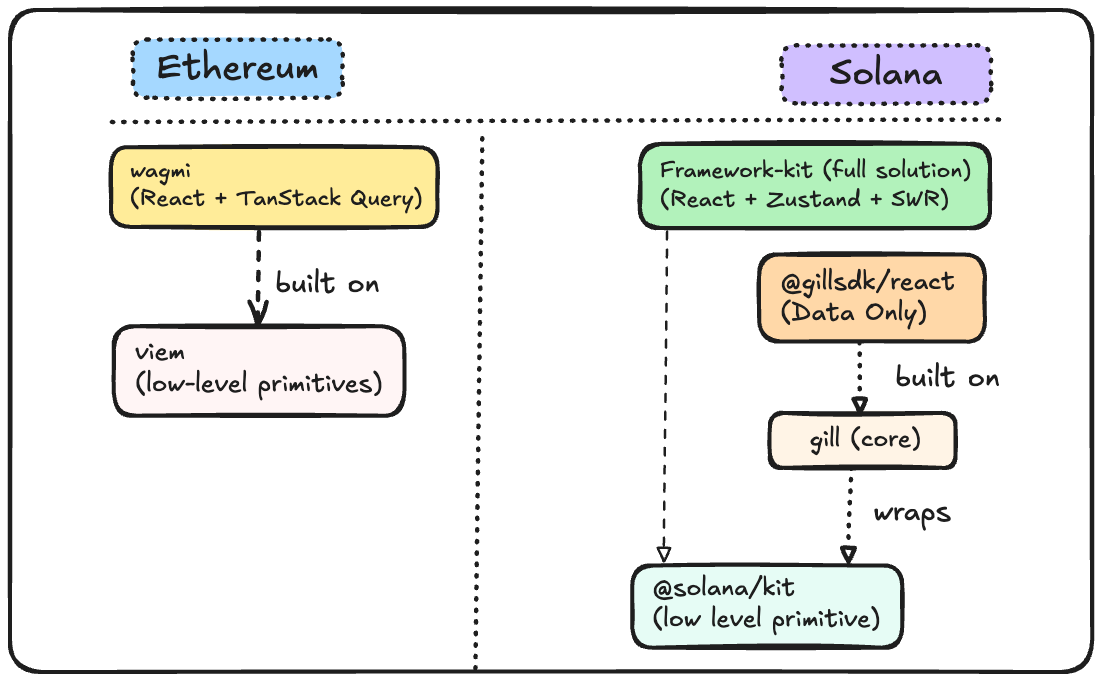
If you're coming from Ethereum development, here's how the Solana ecosystem maps to what you know:
Ethereum → Solana Library Mapping
| Ethereum | Solana | Role |
|---|---|---|
| viem | @solana/kit | Low-level primitives, tree-shakable |
| React Query for viem | @gillsdk/react | Data fetching hooks only |
| wagmi | Framework-Kit | ✅ Complete React solution |
Framework-Kit vs @gillsdk/react
Solana has two React options, but they serve different purposes:
| Feature | Framework-Kit | @gillsdk/react |
|---|---|---|
| What it is | Complete dApp framework | Data fetching hooks |
| Query Layer | SWR | TanStack Query |
| Wallet Connection | ✅ Built-in orchestration | ❌ Bring your own |
| Wallet Auto-discovery | ✅ Yes | ❌ No |
| Wallet Persistence | ✅ Auto-reconnect | ❌ Manual |
| Real-time Subscriptions | ✅ watchBalance, watchAccount |
❌ Manual WebSocket |
| Transaction Pool | ✅ Build multi-ix transactions | ❌ Not included |
| Staking Hooks | ✅ useStake() |
❌ Not included |
| Numeric Utilities | ✅ lamportsMath, createTokenAmount |
❌ Not included |
| Controllers | ✅ State machines for complex flows | ❌ Not included |
| Centralized State | ✅ Zustand (wallet + accounts + txs) | Query cache only |
The key difference:
- @gillsdk/react = Data fetching hooks. You still need to wire up wallet-adapter, handle subscriptions, build transaction logic yourself.
- Framework-Kit = Everything wired up. Wallet orchestration, real-time updates, staking, transaction pools—all working together out of the box and much more coming.
When to Use Each
| Choose | When You Need |
|---|---|
| @solana/kit | Maximum control, building libraries, custom tooling |
| gill (core) | Scripts, backends, CLIs, non-React apps |
| @gillsdk/react | Just data fetching, already using wallet-adapter, minimal setup |
| Framework-Kit | ✅ Full dApp solution: wallets + data + transactions + staking |
Bottom line: If you're building a React dApp and want everything-included (like wagmi on Ethereum), use Framework-Kit. If you just need to fetch some balances and already have wallet handling figured out manually and not needed for some out of the box solution but only some base work then, @gillsdk/react works too.
Framework-Kit combines the best of all approaches with reactive, framework-integrated patterns.
Architecture Overview
Understanding Framework-Kit's architecture helps you use it effectively and debug issues when they arise.
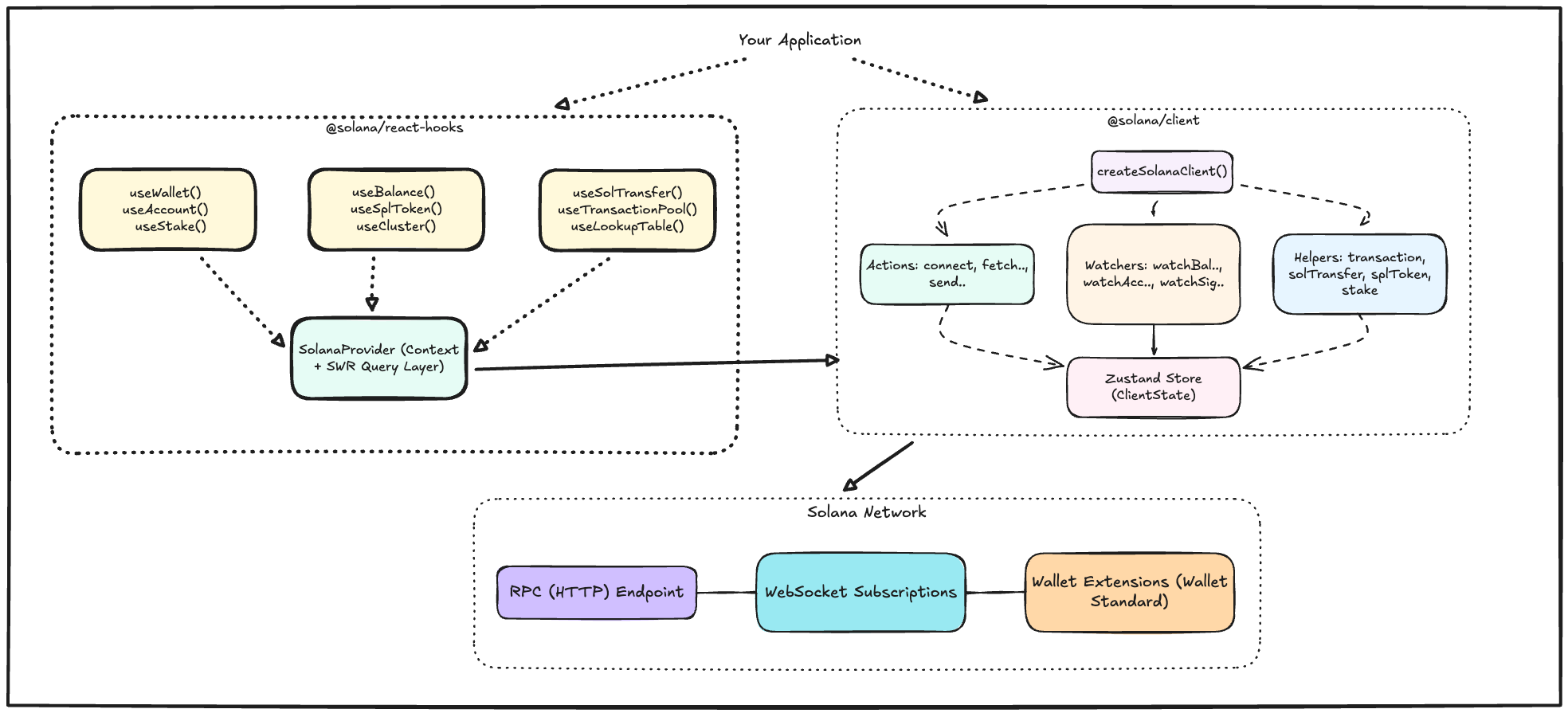
Layer Breakdown
Layer 1: Your Application Your React components, pages, and business logic. You interact with Solana through hooks and providers.
Layer 2: @solana/react-hooks The React-specific layer that provides hooks (useBalance, useSolTransfer, useStake) and the SolanaProvider context. This layer integrates with SWR for caching and revalidation.
Layer 3: @solana/client The framework-agnostic core. Contains:
- Actions: One-shot operations (connect wallet, fetch balance, send transaction)
- Watchers: Real-time subscriptions (watch balance changes, track confirmations)
- Helpers: Pre-built utilities for common patterns (transaction building, token transfers, staking)
- Store: Zustand-powered centralized state
Layer 4: Solana Network The actual blockchain infrastructure—RPC endpoints for queries and transactions, WebSocket connections for real-time updates, and wallet extensions for signing.
Installation
Prerequisites
Before installing Framework-Kit, ensure you have:
- Node.js >= 20.18.0: Framework-Kit uses modern JavaScript features. Check with
node --version. - pnpm >= 10.20.0 (recommended) or npm: pnpm is faster and more efficient. Install with
npm install -g pnpm. - A Solana wallet extension: Phantom, Solflare, or Backpack for testing wallet connections.
Install Packages
# Using pnpm (recommended for faster, more reliable installs)
pnpm add @solana/client @solana/react-hooks

# Using npm
npm install @solana/client @solana/react-hooks

# For projects migrating from @solana/web3.js
pnpm add @solana/web3-compat
If you just want a quick TLDR; than all the detailed breakdown.
┌──────────────────────────────────────────────────────────────────────────┐
│                         Getting Started                                  │
└──────────────────────────────────────────────────────────────────────────┘

    □  1. INSTALL
       pnpm add @solana/client @solana/react-hooks

    □  2. CREATE CLIENT (outside component)
       const client = createSolanaClient({
         endpoint: "https://api.devnet.solana.com",
       });

    □  3. WRAP WITH PROVIDER
       <SolanaProvider client={client}>
         <App />
       </SolanaProvider>

    □  4. USE HOOKS
       const { connectors, connect, connecting } = useWalletConnection();
       const { lamports } = useBalance(address);
       const { send } = useSolTransfer();
       const { stake, unstake, withdraw } = useStake();

    □  5. BUILD YOUR dAPP
       Focus on your product, not boilerplate!
If you want to read in details then let's go ahead and explore:
Getting Started
Next.js Setup
Next.js requires special handling because of its server/client component model. Components using hooks must be marked with 'use client'.
Step 1: Configure Next.js
Create or update next.config.mjs:
/** @type {import('next').NextConfig} */
const nextConfig = {
  reactStrictMode: true,
  transpilePackages: [
    "@solana/client",
    "@solana/react-hooks",
    "@solana/web3-compat",
    "@solana/kit",
  ],
};

export default nextConfig;
The transpilePackages array tells Next.js to transpile these packages for compatibility. This is required because Framework-Kit uses modern JavaScript features.
Step 2: Create a Client Provider
Create app/providers.tsx:
'use client';

import { createSolanaClient } from '@solana/client';
import { SolanaProvider } from '@solana/react-hooks';
import type { PropsWithChildren } from 'react';

const client = createSolanaClient({
  endpoint: process.env.NEXT_PUBLIC_SOLANA_RPC ?? 'https://api.devnet.solana.com',
});

export default function Providers({ children }: PropsWithChildren) {
  return (
    <SolanaProvider client={client}>
      {children}
    </SolanaProvider>
  );
}
The 'use client' directive is required because SolanaProvider uses React context, which only works in client components. The client is created once outside the component to avoid recreating it on every render. The endpoint comes from an environment variable with a devnet fallback.
Step 3: Wrap Your Layout
Update app/layout.tsx:
import type { Metadata } from 'next';
import type { ReactNode } from 'react';
import Providers from './providers';
import './globals.css';

export const metadata: Metadata = {
  title: 'My Solana App',
  description: 'Built with Framework-Kit',
};

export default function RootLayout({ children }: { children: ReactNode }) {
  return (
    <html lang="en">
      <body>
        <Providers>{children}</Providers>
      </body>
    </html>
  );
}
The Providers component wraps all children, making Solana hooks available throughout your app. Since layout.tsx is a server component by default, it can import and render the client component.
Step 4: Create Client Components
Create app/components/wallet-panel.tsx:
'use client';

import { useWalletConnection, useBalance } from '@solana/react-hooks';

export function WalletPanel() {
  const { connectors, connect, disconnect, wallet, status, connecting } = useWalletConnection();
  const address = wallet?.account.address;
  const balance = useBalance(address);

  if (status === 'connected') {
    return (
      <div className="space-y-2">
        <p>Connected: {address?.toString()}</p>
        <p>Balance: {balance.lamports?.toString() ?? 'Loading...'} lamports</p>
        <button onClick={disconnect}>Disconnect</button>
      </div>
    );
  }

  return (
    <div className="space-y-2">
      <h3 className="font-semibold">Connect a Wallet</h3>
      {connectors.map((c) => (
        <button
          key={c.id}
          disabled={connecting}
          onClick={() => connect(c.id)}
          className="block w-full px-4 py-2 border rounded hover:bg-gray-50 disabled:opacity-50"
        >
          {c.name}
        </button>
      ))}
    </div>
  );
}
Any component using Framework-Kit hooks must have the 'use client' directive. The useWalletConnection hook provides wallet connection state and methods, while useBalance automatically fetches and subscribes to balance updates.
Step 5: Use in Pages
Use the client component in your pages:
import { WalletPanel } from './components/wallet-panel';

export default function Home() {
  return (
    <main className="container mx-auto p-8">
      <h1 className="text-3xl font-bold mb-8">My Solana dApp</h1>
      <WalletPanel />
    </main>
  );
}
Server components (like page.tsx by default) can import and render client components. The WalletPanel runs in the browser and has access to wallet extensions.
Important Next.js Notes
| Rule | Why |
|---|---|
Mark hook-using components with 'use client' |
Hooks only work in client components |
| SolanaProvider must be in a client component | It uses React context |
| Don't call hooks in server components | They have no meaning on the server |
Use NEXT_PUBLIC_ prefix for client-side env vars |
Only NEXT_PUBLIC_ vars are exposed to browser |
| Create client outside component body | Prevents recreation on every render |
Hooks
After setting up the provider, you can use hooks throughout your app. Hooks provide reactive access to wallet state, balances, and transaction status.
| Hook | Purpose |
|---|---|
| Wallet Hooks | |
useWallet() |
Access wallet status and session |
useWalletConnection() |
Connect, disconnect, list connectors |
useWalletSession() |
Get current wallet session |
useWalletActions() |
Direct access to wallet actions |
useWalletModalState() |
Manage wallet connection modal state |
| Data Hooks | |
useBalance(address) |
Reactive balance tracking |
useAccount(address) |
Account data with auto-refresh |
useLookupTable(address) |
Address lookup table data |
useNonceAccount(address) |
Durable nonce account data |
| Transaction Hooks | |
useSolTransfer() |
Send SOL easily |
useSplToken(mint) |
SPL token balance and transfers |
useSendTransaction() |
Send arbitrary transactions |
useTransactionPool() |
Build complex transactions |
| Staking Hooks | |
useStake() |
Delegate, undelegate, withdraw stake |
| Query Hooks | |
useLatestBlockhash() |
Get current blockhash |
useProgramAccounts(program) |
Query program accounts |
useSimulateTransaction(wire) |
Simulate transactions |
useSignatureStatus(signature) |
Check transaction status |
useWaitForSignature(signature) |
Wait for confirmation |
| Cluster Hooks | |
useClusterState() |
Get cluster configuration |
useClusterStatus() |
Get cluster connection status |
| Utility Hooks | |
useClientStore(selector) |
Access Zustand store directly |
useSolanaClient() |
Get the Solana client instance |
Actions
Actions are Promise-based functions that interact with the Solana network. Use them for one-time operations like connecting wallets, fetching data, or sending transactions.
| Action | Description |
|---|---|
connectWallet(connectorId) |
Connect a wallet via Wallet Standard |
disconnectWallet() |
Disconnect the active wallet |
fetchAccount(address) |
One-time account data fetch |
fetchBalance(address) |
Get lamport balance |
fetchLookupTable(address) |
Fetch address lookup table data |
fetchLookupTables(addresses) |
Fetch multiple lookup tables |
fetchNonceAccount(address) |
Fetch durable nonce account |
sendTransaction(tx) |
Submit a transaction |
setCluster(endpoint) |
Switch RPC endpoint |
requestAirdrop(address, lamports) |
Request devnet SOL |
Watchers (Subscriptions)
Watchers subscribe to real-time updates via WebSocket. They're useful for tracking balance changes, account updates, or transaction confirmations.
| Watcher | Description |
|---|---|
watchBalance(config, callback) |
Subscribe to balance changes |
watchAccount(config, callback) |
Subscribe to account data changes |
watchSignature(signature, callback) |
Track transaction confirmation |
Helpers
Helpers combine multiple actions into common workflows, reducing boilerplate for frequent operations.
| Helper | Description |
|---|---|
client.helpers.transaction |
Transaction building and sending |
client.helpers.solTransfer |
SOL transfers |
client.helpers.splToken |
SPL token operations |
client.helpers.stake |
Staking operations |
Framework-Kit represents a fundamental shift in how developers build Solana dApps. Instead of piecing together wallet adapters, manual state management, WebSocket subscriptions, and transaction builders, you get a unified framework that handles all of this automatically.
The built-in wallet orchestration discovers and connects to any Wallet Standard wallet, real-time subscriptions keep your UI in sync with on-chain changes, and transaction pools let you build complex operations incrementally.
With staking support, type-safe numeric utilities, and centralized state management all working together out of the box, Framework-Kit eliminates the friction that has made Solana development unnecessarily complex.
This guide covers the current hooks, actions, and features available today, but Framework-Kit is actively evolving with new capabilities and will continue to expand its support for a wide range of Solana use cases.
Additional Resources
- GitHub Repository: github.com/solana-foundation/framework-kit